I've been building a game called Belt Nine. It's third person, you fly around an asteroid belt, shoot rocks until they come apart, fill your hold and take it home to the mothership. Vanilla JavaScript, no engine, no libraries, and no assets at all: the whole belt comes out of a seed and the soundtrack is played by a sequencer instead of an mp3.
The part I'm most happy with is a settings row called THEME. It has two values, and they are not filters. They're two different renderers, and you can swap them without leaving the flight.
Same scene, twice
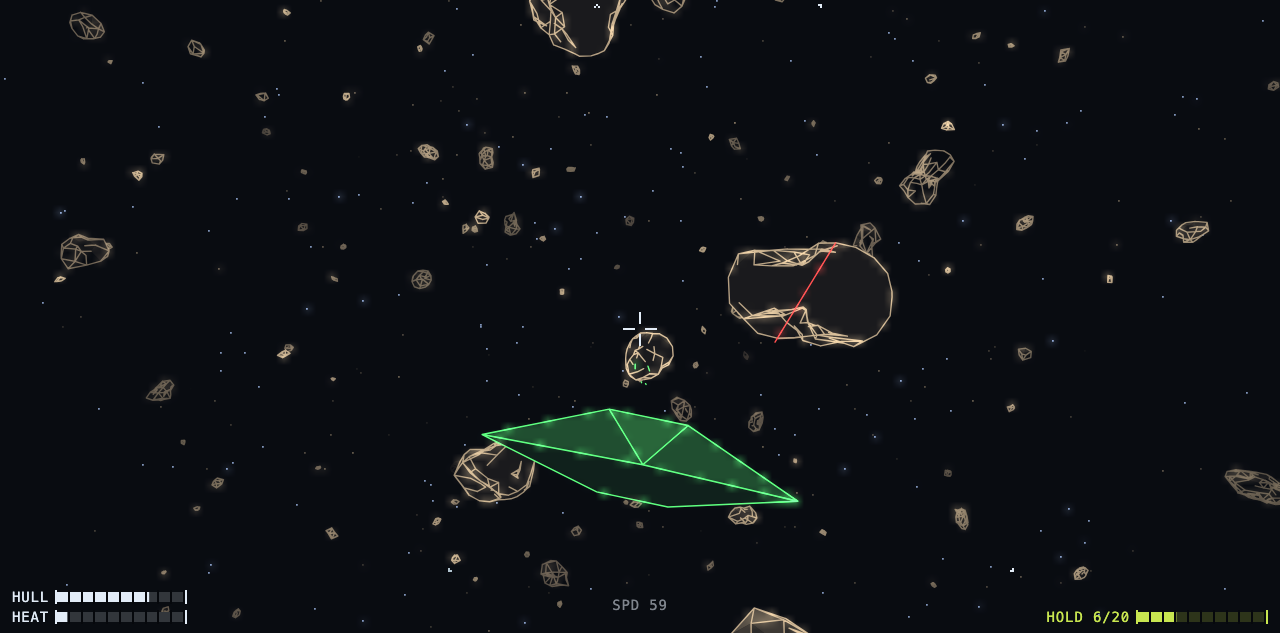
This is what the game opens as: lines, drawn at whatever resolution your display has:
This is the pixel one, which is a real framebuffer and not a filter over the one above:
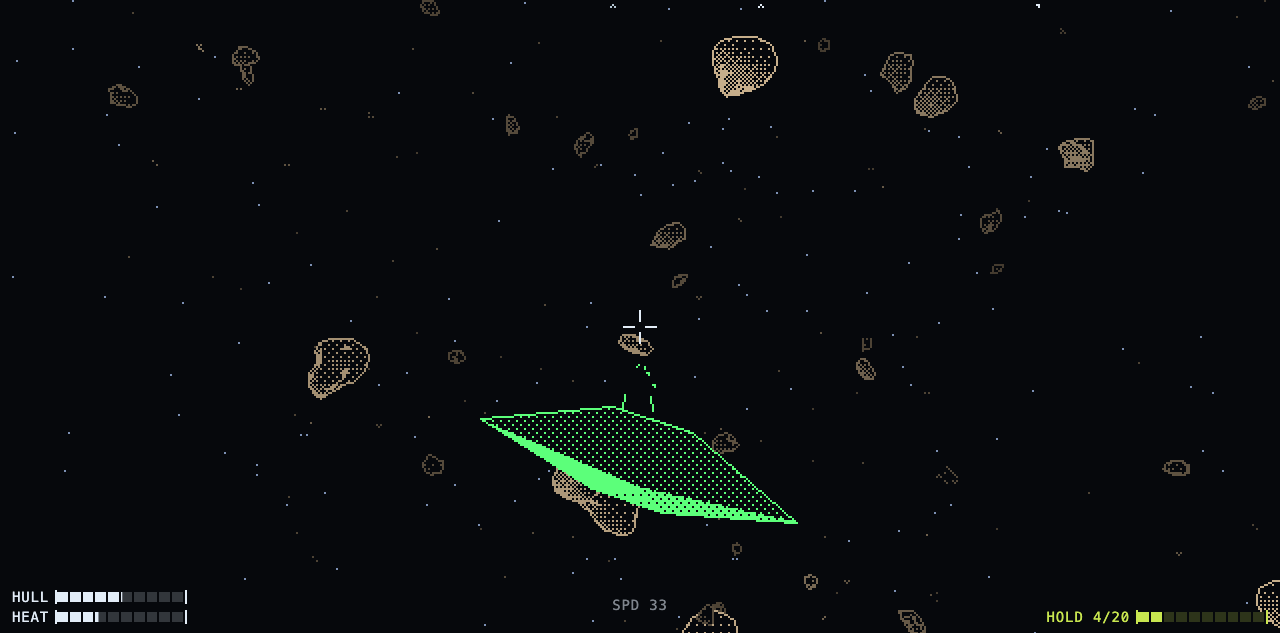
Same seed, same world, same projection, same sort order. Only the marks are different.
The scene renderer can't tell which one it's talking to
There's exactly one file that turns the world into screen positions. 3D floats in, 2D out, everything drawn back to front because there is no depth buffer anywhere in this game: painter's order is the depth buffer. That file never touches a canvas. It calls whatever object is sitting in screen.paint:
export const RASTER = {
  strokes: false,
  tint: true,
  grain: 1,
  lodMax: 3,
  creaseCos: null,
  clear, plot, dot, line, circle, disc, fillTriangleShaded,
  beginBody: () => {},
  endBody: () => {},
  resize: resizeScreen,
  finish: blit,
};
Seven drawing calls and a handful of facts. Switching renderer is assigning a different object to that field.
The functions are the boring half. The facts are the half that made this actually work, because they're what let the renderer stop caring:
- grain: how many art pixels the smallest mark of this backend covers.
- lodMax: how far up the mesh detail ladder it's worth climbing. 3 for pixels, 2 for lines.
- creaseCos: the fold angle worth drawing an edge along, or null for "never ask me that".
- strokes, tint: whether edges come out as lines, and whether distance should be spent on the colour ramp.
My first attempt at this had the same code once per renderer, branching on the theme name all the way down, which is exactly as bad as it sounds. The version that works asks the backend a question instead:
const marks = rs / paint.grain; // radius in marks this backend can make
rs is a rock's radius on screen in art pixels; marks is that same radius in the units the backend actually draws in. Every size threshold in the renderer is measured in marks rather than pixels, so "too small to bother meshing" is the backend's answer to give and nobody had to write the branch.
1. Pixels
A Uint8Array, one byte per pixel, and that byte is a palette index, never a colour, never a brightness. Shading is a 4x4 Bayer matrix, so a continuous shade becomes a stable dither pattern instead of noise:
export function ditherAt(shade, x, y) {
  return shade * 16 > BAYER[(y & 3) * 4 + (x & 3)] ? 1 : 0;
}
Once a frame the whole buffer goes through a lookup table and out:
for (let i = 0; i < data.length; i++) px[i] = PALETTE[data[i]];
ctx.putImageData(img, 0, 0);
That's the entire "pixel art" of it. Nothing is rendered big and scaled down, nothing is posterized afterwards, which is the argument for the whole design, really. A filter can only ever know what survived; a backend gets asked before anything is thrown away.
The nice side effect is that the palette is one file of 35 entries, and the interface reads the same values as CSS variables, so retuning the game's colours retunes the HUD and the menus with it. The stylesheet has exactly one hex value in it, and it's the page background, because that one has to paint before any script runs.
2. Lines
Same projection, but strokes onto the canvas at the display's own resolution, so this one is crisp on a retina screen while the pixel one is deliberately not.
Two decisions make it cheap enough to run. Shade is quantized into 8 bands, so every face at the same brightness is one path and one fill rather than hundreds. And an edge is only stroked when the two faces meeting along it disagree by more than 22 degrees:
const CREASE = Math.cos((22 * Math.PI) / 180);
Lower and you can see the tessellation of the mesh; higher and the rocks go flat. I tuned it by eye and there is no principled answer.
Line width is 1.4 device pixels, which looks like a magic number and is. At exactly 1 some browsers snap lines to the pixel grid, and the whole picture shimmers when you roll.
How do you test two renderers?
The logic tests (about 3,000 of them, plain Node, no DOM, no timers, dt is just a number I pass in) are no help here at all. They'll happily prove the projection is correct while the page draws absolutely nothing.
So there's a second kind of check that launches headless Chrome, drives the real game over the DevTools protocol, and reads pixels back off the canvas. One per backend. The vector one exists to ask the single question a headless framebuffer can't answer: did strokes actually land on the glass. And not by asking "is the canvas non-empty", since there's a bloom pass that leaves a wash of near-background pixels around every line, and counting those rates a blank screen as a drawn one. It has to be lit meaningfully off the void.
Every screenshot in this post came out of that harness. There's an ?autoplay=1 flag that hands every seat to an autopilot which flies, mines, fights and docks indefinitely, through the same bag of inputs a hand writes to, and nothing else in the game knows it exists. I don't frame these shots: the autopilot picks the moment, I just press the shutter.
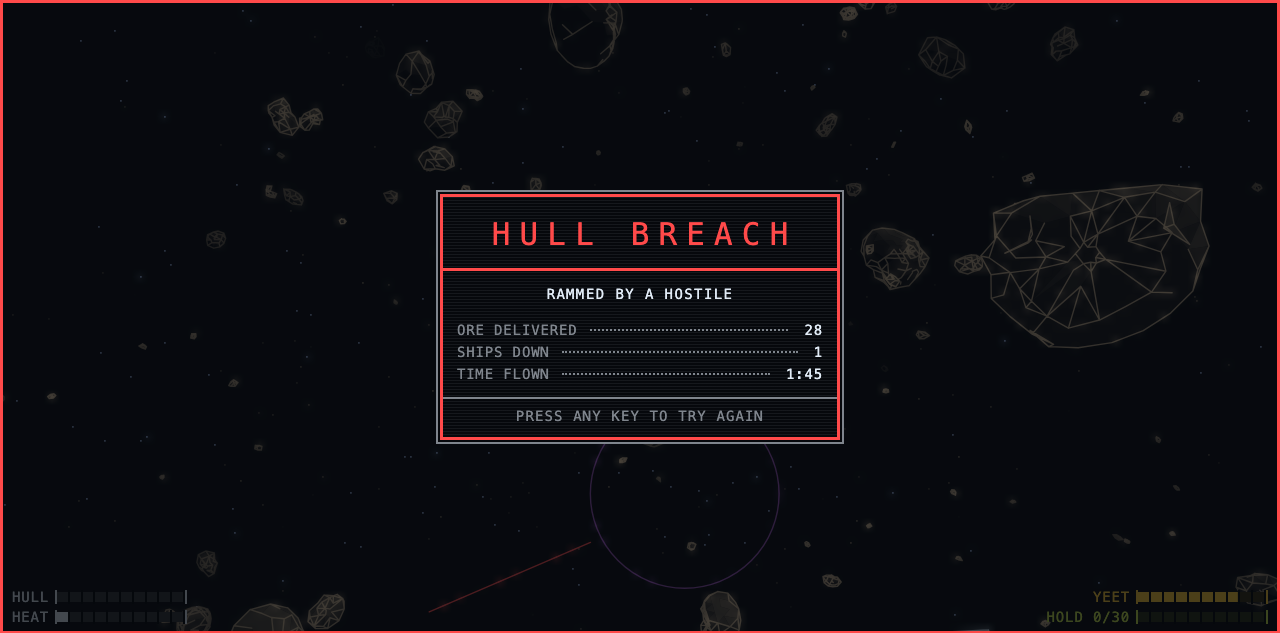
The one below is the exception, since I did have to arrange for the poor thing to die, but the 28 units of ore on it were flown home by the autopilot, one hold at a time:
Play it
It's at beltnine.curzel.it. It runs in a browser, no install, no account, and it never talks to anything. THEME is in the settings if you want to see the other one.